Mortgage Comparison Spreadsheet
Compare up to four Australian home loan scenarios in a free Excel spreadsheet. See repayments, five-year balances, interest, fees and lifetime cash outflow.
Put up to four home loan options beside one another using the same definitions for repayments, fees and remaining debt. This mortgage comparison spreadsheet shows where a cost difference comes from. It identifies the lowest estimated cost under entered assumptions and does not recommend a loan.
Free XLSX. No signup or email required.
Reviewed and maintained by the Calcy team · 17 October 2026 · General information, not personal financial advice.
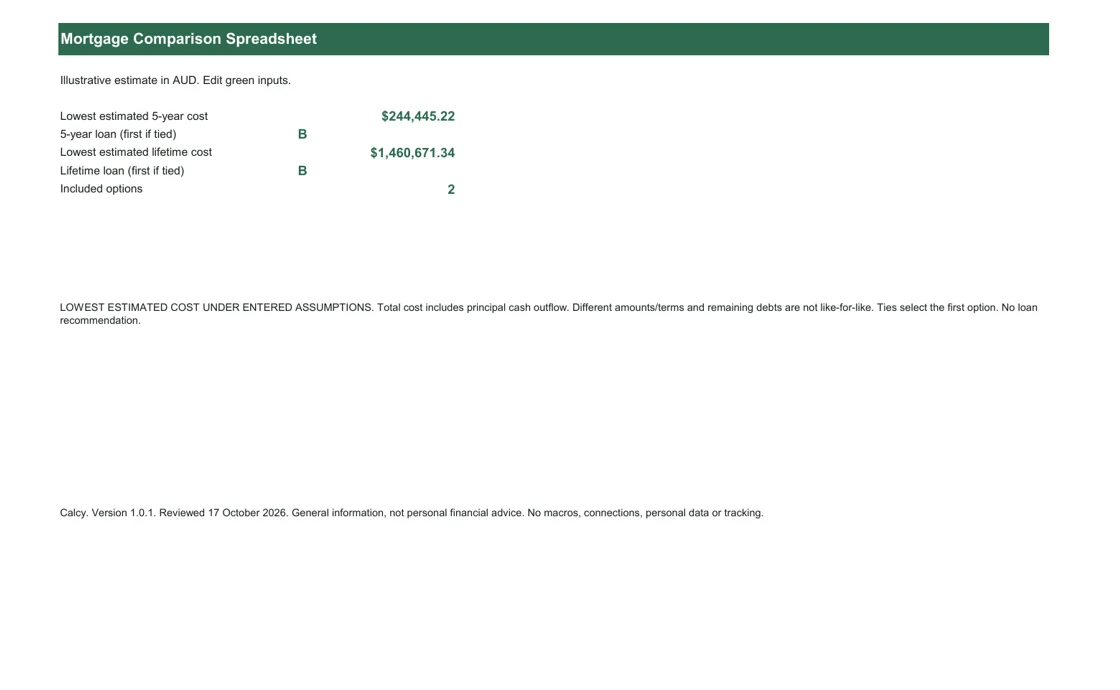
Inside the workbook
- Dashboard
- Loan Inputs
- Comparison Summary
- 5-Year Comparison
- Lifetime Comparison
- Charts
- Instructions
XLSX for Excel. Editable inputs, protected formulas, no macros or external data connections. Save a personal copy before editing.
Compare the whole offer, not just the headline repayment
Each option has a loan amount, annual interest rate, whole-year term and monthly, fortnightly or weekly repayment frequency. Enter annual account and package fees separately, plus establishment and other upfront costs. Include one to four options; unused columns can be excluded without completing their inputs.
The summary shows periodic and annual repayments, first-year cash outflow and lifetime interest, fees and cash outflow. The five-year view separates repayments, remaining principal, principal repaid, interest and fees. A lower repayment alone does not show a cheaper borrowing arrangement, particularly when term or principal differs.
A transparent example you can change
The illustrative starting offers use $650,000 over 30 years. Loan A has a 6.39% rate, $120 annual account fee, $300 annual package fee and $1,000 establishment fee. Loan B uses 6.29%, the same recurring fees and $1,200 total upfront costs. These are editable examples, not advertised rates or current lender offers.
Change one factor at a time: raise the package fee, shorten a term or select weekly repayments. The five-year and lifetime comparisons can rank differently because upfront costs and ongoing interest affect different horizons. For a fair comparison, first hold loan size and term constant, then examine feature differences outside the cash-flow totals.
Repayment frequency and cost definitions
The workbook uses Calcy’s frequency-aware mortgage engine: annual rate divided by 12, 26 or 52, with term multiplied by the same number. A fortnightly required repayment is not the accelerated practice of paying half a monthly repayment every two weeks. Zero-interest loans use principal divided by the number of repayments. For numerical stability, annual rates at or below 1e-12 in decimal form (0.0000000001%) use that zero-interest branch; rates above that through 1e-6 use an equivalent small-rate series. These are numerical conventions, not lending thresholds.
Five-year interest is repayments less principal repaid, with the ending balance exposed. Cash outflow includes principal, interest and entered fees. It is not an interest-only cost measure or a net-worth comparison. A term shorter than five years stops repayments and recurring fees at its model end. Upfront charges occur once and are paid outside the loan.
Features, limitations and responsible interpretation
Keep a copy of each lender quote alongside the workbook and record when you entered it. Check whether the quoted fee is annual or once-only before choosing its input row. If two offers leave different debts after five years, read that balance difference alongside the cash paid before ranking them.
Offset availability is an informational Yes/No field. The workbook does not estimate offset savings; use the Offset Account Planner for that separate model. An optional comparison-rate field records a rate supplied by you but never replaces the actual interest rate in repayment calculations. Introductory-rate periods are deferred rather than approximated ambiguously.
The visible label is LOWEST ESTIMATED COST UNDER ENTERED ASSUMPTIONS. It does not mean best loan, lender approval or a personal recommendation. Rates and fees stay constant. Ties identify the first matching option. No cashback, tax, interest-only period or future rate path is included. Avoid double counting a package charge that already includes an account fee, and verify each figure against the lender’s documents.
Check the method and compare online
General context: ASIC Moneysmart: choosing a home loan. Calculations use the methodology and assumptions explained above.
Optional email updates
Get new Calcy tools and home-buying updates
Free calculators, spreadsheets and practical Australian home-buying resources. Unsubscribe anytime. Confirm your address by email before receiving updates. Downloading never signs you up.
Frequently asked questions
Can I compare four loans?
Yes. Set Include loan to Yes for one to four columns. Excluded columns do not need complete numeric inputs.
Does the comparison rate determine repayments?
No. It is an optional reference field. Repayments use the entered annual interest rate, term and frequency.
Are five-year costs only interest?
No. Total cash outflow includes principal repayments, interest and fees. Separate interest and remaining-balance rows help interpretation.
Does the lowest estimate identify the best loan for me?
No. It ranks the entered model costs only. Suitability, features, restrictions and lender assessment are separate considerations.
General information and estimates, not personal financial advice. Check assumptions and official sources before making decisions.