Mortgage Repayment Spreadsheet
Free Australian mortgage repayment spreadsheet with monthly, fortnightly and weekly schedules, annual summaries and editable charts. No email required.
Plan a principal-and-interest home loan in Excel, with your inputs, a repayment-by-repayment schedule and a clear split between principal and interest. Download a working workbook rather than a fixed sample. It stays on your device and needs no signup.
Free XLSX. No signup or email required.
Reviewed and maintained by the Calcy team · 17 October 2026 · General information, not personal financial advice.
Inside the workbook
- Dashboard
- Loan Inputs
- Repayment Schedule
- Annual Summary
- Charts
- Instructions
XLSX for Excel. Editable inputs, protected formulas, no macros or external data connections. Save a personal copy before editing.
What is included
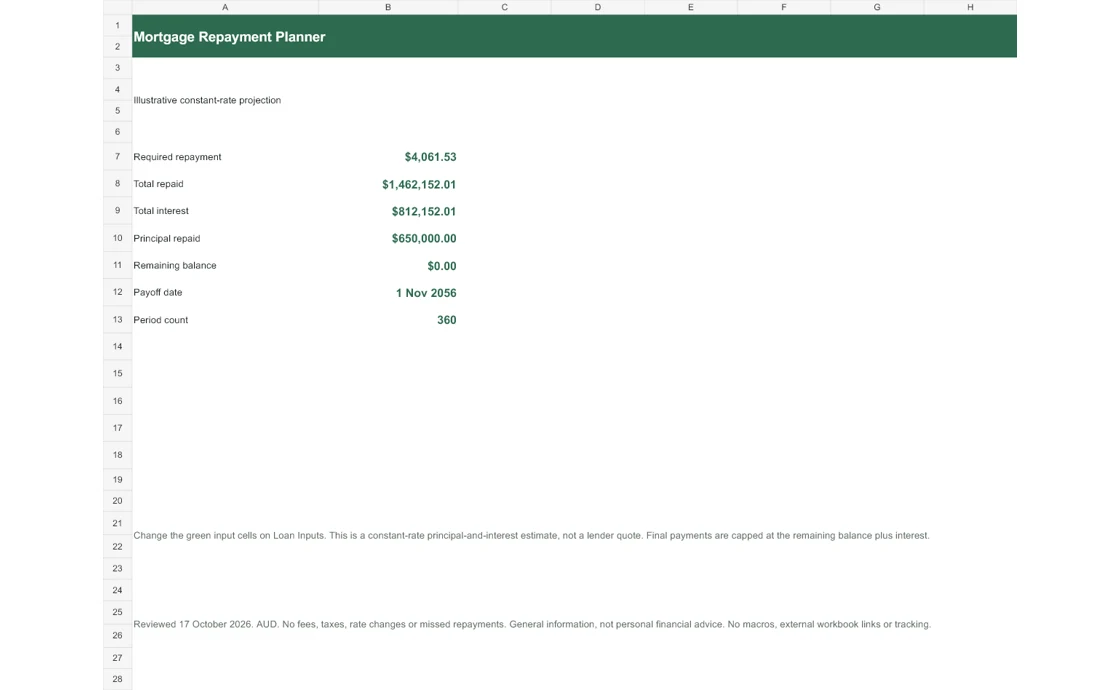
The Dashboard shows the required payment for your selected frequency, total payments, total interest, principal repaid, remaining balance and an estimated payoff date. The inputs sheet keeps the loan amount, annual rate, whole-year term, start date and repayment frequency together.
The schedule shows each payment date, opening balance, payment, interest, principal and closing balance. Annual Summary groups these into loan years. Two editable charts show the remaining balance and how the annual principal and interest split changes.
Who this planner is for
Use it when comparing an affordable repayment budget, checking how a shorter term changes interest, or keeping a transparent record of the assumptions behind a home-loan estimate. A first home buyer can pair it with the Budget Planner to separate buying costs from ongoing repayments.
It models a fully amortising principal-and-interest loan. It is not designed for interest-only periods, construction drawdowns, variable rate paths or arrears. Use lender documents for contractual repayments.
Worked example: a $650,000 loan
At an illustrative 6.39% annual rate over 30 years with monthly repayments, the model gives $4,061.53 per month and approximately $812,152 total interest. The rate is an editable example, not a current offer. The final payment is capped at the amount owing.
Choosing a shorter term increases the required payment but generally reduces total interest at the same positive rate. Change one input at a time and use the schedule to see the trade-off, rather than comparing repayment amounts alone.
How the spreadsheet calculates repayments
The workbook follows the same frequency-aware amortisation logic as Calcy’s mortgage calculator. The periodic rate is the annual rate divided by 12, 26 or 52; the number of periods is the term multiplied by that count. The zero-interest branch divides the principal evenly across the periods.
Interest is opening balance multiplied by periodic rate. Principal is payment less interest, capped at the outstanding principal. Closing balance becomes the next opening balance. Calculations retain precision while currency is displayed to cents. Tiny final rounding residuals follow the web model.
Monthly, fortnightly and weekly are different conventions
This workbook calculates a frequency-specific required payment. Fortnightly does not mean half the monthly payment every two weeks. That accelerated strategy pays the equivalent of an extra monthly payment each year and should be explored separately with the Extra Repayment Planner.
Monthly dates advance by calendar month; fortnightly and weekly dates advance by 14 and 7 days. These are planning dates. Actual lender due dates, daily interest and holiday rules may differ. Annual Summary means years since the loan starts, not Australian financial years.
Before you rely on the result
Rates stay constant and the loan has no fees, missed payments, offset or extra repayments. Enter a numeric loan from zero to $100 million, a rate from 0% to 30% and a whole-year term from 1 to 40. These are supported model bounds, not lending criteria. Invalid inputs leave outputs unavailable rather than manufacturing a zero estimate.
Green-shaded cells are editable. Formula protection helps prevent accidental edits and is not encryption. Save a personal copy, change the inputs and compare the Dashboard with the online calculator. Check results after importing into another spreadsheet application.
Check the method and compare online
Read ASIC Moneysmart on paying off a mortgage faster and how mortgage offset accounts work. These explain the concepts; the workbook uses Calcy’s stated model assumptions.
Optional email updates
Get new Calcy tools and home-buying updates
Free calculators, spreadsheets and practical Australian home-buying resources. Unsubscribe anytime. Confirm your address by email before receiving updates. Downloading never signs you up.
Frequently asked questions
Is this mortgage repayment spreadsheet free?
Yes. Download the XLSX without an email address, account or payment. There are no macros or external data connections.
Does it recalculate when I change the loan?
Yes. Change the green input cells in Excel with Automatic calculation enabled. The schedule, summaries and charts use workbook formulas.
Is fortnightly half the monthly repayment?
No. This planner calculates a required payment using 26 periods per year. Paying half a monthly payment every fortnight is an accelerated strategy.
Can I model a changing interest rate?
This version uses one constant annual rate. Save separate copies for rate scenarios; it does not model a date-by-date variable-rate path.
General information and estimates, not personal financial advice. Check assumptions and official sources before making decisions.